DevOps
kpack - A guide to build optimized app-image
kpack extends Kubernetes and utilizes it’s capabilities for building OCI images as a platform implementation of Cloud Native Buildpacks (CNB)
kpack extends Kubernetes and utilizes kubernetes capabilities to provide builds of OCI images as a platform implementation of Cloud Native Buildpacks (CNB). It provides a declarative image type that builds an image ( with app source and configurations) and then schedules image rebuilds for any source or underlying buildpack changes.
Some history about kpack
Buildpacks were first conceived by Heroku in 2011. Later, Pivotal and Heroku teamed up to create Cloud Native Buildpacks for Kubernetes. Then, Pivotal open-sourced kpack, which started as an experimental build service Kubernetes resource controllers but soon going to be the key to app build and modernisation process.
Prerequisites for image build
- A Kubernetes cluster version 1.15 or later
- kubectl CLI
- User with cluster-admin permission
- Accessible Docker V2 Registry
Configure kpack
kpack services provide a kubernetes build type to execute a single Cloud Native Buildpack image build. The process generates an image resource which actively keeps watch on any buildpack or source change for rebuild. For supporting the App image creation process, there would be a cache maintained as persistent-storage for each image resource with all the underlying app dependencies & supporting resources during image build process.
Install kpack
We can download the resources for kpack from here We can apply resources to install kpack to a kubernetes cluster.
kubectl apply -f release-0.0.9.yaml
Result shows various resource created in k8s cluster.
$ kubectl apply -f release-0.2.2.yamlnamespace/kpack createdcustomresourcedefinition.apiextensions.k8s.io/builds.kpack.io createdcustomresourcedefinition.apiextensions.k8s.io/builders.kpack.io createdcustomresourcedefinition.apiextensions.k8s.io/clusterbuilders.kpack.io createdcustomresourcedefinition.apiextensions.k8s.io/clusterstores.kpack.io createdconfigmap/build-init-image createdconfigmap/build-init-windows-image createdconfigmap/rebase-image createdconfigmap/lifecycle-image createdconfigmap/completion-image createdconfigmap/completion-windows-image createddeployment.apps/kpack-controller createdserviceaccount/controller createdclusterrole.rbac.authorization.k8s.io/kpack-controller-admin createdclusterrolebinding.rbac.authorization.k8s.io/kpack-controller-admin-binding createdrole.rbac.authorization.k8s.io/kpack-controller-local-config createdrolebinding.rbac.authorization.k8s.io/kpack-controller-local-config-binding createdcustomresourcedefinition.apiextensions.k8s.io/images.kpack.io createdservice/kpack-webhook createdcustomresourcedefinition.apiextensions.k8s.io/sourceresolvers.kpack.io createdcustomresourcedefinition.apiextensions.k8s.io/clusterstacks.kpack.io createdWarning: admissionregistration.k8s.io/v1beta1 MutatingWebhookConfiguration is deprecated in v1.16+, unavailable in v1.22+; use admissionregistration.k8s.io/v1 MutatingWebhookConfigurationmutatingwebhookconfiguration.admissionregistration.k8s.io/defaults.webhook.kpack.io createdWarning: admissionregistration.k8s.io/v1beta1 ValidatingWebhookConfiguration is deprecated in v1.16+, unavailable in v1.22+; use admissionregistration.k8s.io/v1 ValidatingWebhookConfigurationvalidatingwebhookconfiguration.admissionregistration.k8s.io/validation.webhook.kpack.io createdsecret/webhook-certs createddeployment.apps/kpack-webhook createdserviceaccount/webhook createdrole.rbac.authorization.k8s.io/kpack-webhook-certs-admin createdrolebinding.rbac.authorization.k8s.io/kpack-webhook-certs-admin-binding createdclusterrole.rbac.authorization.k8s.io/kpack-webhook-mutatingwebhookconfiguration-admin createdclusterrolebinding.rbac.authorization.k8s.io/kpack-webhook-certs-mutatingwebhookconfiguration-admin-binding createdWe can observe the controller and webhook resources created for kpack.
$ kubectl get all -n kpackNAME READY STATUS RESTARTS AGEpod/kpack-controller-6d7b8f49ff-fcc8d 1/1 Running 0 17spod/kpack-webhook-597484b97-pzbtp 1/1 Running 0 17sNAME TYPE CLUSTER-IP EXTERNAL-IP PORT(S) AGEservice/kpack-webhook ClusterIP 100.71.36.244 <none> 443/TCP 18sNAME READY UP-TO-DATE AVAILABLE AGEdeployment.apps/kpack-controller 1/1 1 1 18sdeployment.apps/kpack-webhook 1/1 1 1 18sNAME DESIRED CURRENT READY AGEreplicaset.apps/kpack-controller-6d7b8f49ff 1 1 1 18sreplicaset.apps/kpack-webhook-597484b97 1 1 1 18sOnce we install kpack, the following kubernetes custom resources get installed in to the cluster.
$ kubectl api-resources | grep kpack -ibuilders bldr,bldrs kpack.io/v1alpha1 true Builderbuilds cnbbuild,cnbbuilds,bld,blds kpack.io/v1alpha1 true Buildclusterbuilders clstbldr,clstbldrs kpack.io/v1alpha1 false ClusterBuilderclusterstacks kpack.io/v1alpha1 false ClusterStackclusterstores kpack.io/v1alpha1 false ClusterStoreimages cnbimage,cnbimages,img,imgs kpack.io/v1alpha1 true Imagesourceresolvers kpack.io/v1alpha1 true SourceResolverAdd custom certs to kpack
In case we are using a registry that has a self-signed certificate, need to update kpack controller to trust that certificate. It can be done by using SSL_CERT_FILE and SSL_CERT_DIR environment variables, so registry can be trusted by mounting the certificates into the controller’s deployment and setting the environment variable.
To perform, we need to create a kubernetes secret of tls type with the cert and key for the registry’s CA. Then, mount the secret into kpack controller and pass the path as an environment variable.
$ kubectl create secret tls custom-ca --cert=ca.crt --key=ca.key -n kpacksecret/custom-ca created$ kubectl edit deploy kpack-controller -n kpackapiVersion: apps/v1kind: Deploymentmetadata: name: kpack-controller namespace: kpackspec: replicas: 1 selector: matchLabels: app: kpack-controller template: metadata: labels: app: kpack-controller version: 0.2.2-rc.1 spec: serviceAccountName: controller nodeSelector: kubernetes.io/os: linux volumes: - name: custom-certs secret: secretName: custom-ca containers: - name: controller image: gcr.io/cf-build-service-public/kpack/controller@sha256:ec256da7e29eeecdd0821f499e754080672db8f0bc521b2fa1f13f6a75a04835 volumeMounts: - name: custom-certs mountPath: /certs env: - name: SSL_CERT_DIR value: /certsInstall logs utility
We would also install the kpack log utility. It would be used later to access and monitor build logs for image creation process. The utility resource to install can be found here.
$ logs -hUsage of logs: -build string The build number to tail logs -image string The image name to tail logs -kubeconfig string Path to a kubeconfig. -master string The address of the Kubernetes API server. Overrides any value in kubeconfig. -namespace string The namespace of the image (default "default")Prepare cluster for image builds
The entire cloud native buildpack stack consists of some key components. We would prepare the cluster with those components.
Configure ClusterStack
A ClusterStore resource is a repository of buildpacks packaged in buildpackages that can be used by kpack to build images.
apiVersion: kpack.io/v1alpha1kind: ClusterStoremetadata: name: defaultspec: sources: - image: gcr.io/paketo-buildpacks/java - image: gcr.io/paketo-buildpacks/nodejsConfigure ClusterStore
A ClusterStack resource is the specification for a cloud native buildpacks stack used during build and in the resulting app image. A stack is composed of two images that are intended to work together:
- The build image of a stack provides the base image from which the build environment is constructed. The build environment is the containerized environment in which the lifecycle (and thereby buildpacks) are executed.
- The run image of a stack provides the base image from which application images are built.
apiVersion: kpack.io/v1alpha1kind: ClusterStackmetadata: name: basespec: id: "io.buildpacks.stacks.bionic" buildImage: image: "paketobuildpacks/build:base-cnb" runImage: image: "paketobuildpacks/run:base-cnb"Configure ClusterBuilder
A Builder is the kpack configuration for a builder image that includes the stack and buildpacks needed to build an image from your app source code. This builder object uses a ClusterStore, a ClusterStack, and an order definition to construct a builder image.
clusterbuilder.yml
$ cat clusterbuilder.ymlapiVersion: kpack.io/v1alpha1kind: ClusterBuildermetadata: name: defaultspec: tag: pvtregistry.txvlab.com/kpack/builder stack: name: base kind: ClusterStack store: name: default kind: ClusterStore serviceAccountRef: name: build-sa namespace: kpack order: - group: - id: paketo-buildpacks/java - group: - id: paketo-buildpacks/nodejsI have also created a kubernetes secret of registry type to pass the credentials for the private registry. We assign the secret to act as the imagePullSecret during builder creation, by assigning secret to service account “build-sa”
$ cat build-sa.ymlapiVersion: v1kind: ServiceAccountmetadata: name: build-sasecrets: - name: regcredhbrimagePullSecrets: - name: regcredhbrInstall clusterBuilder :
$ kubectl apply -f clusterbuilder.ymlclusterbuilder.kpack.io/default createdResult:
$ kubectl get clusterbuilders.kpack.io defaultNAME LATESTIMAGE READYdefault pvtregistry.txvlab.com/kpack/builder@sha256:f819bc21837c2faf9858934c810bfc3ee9739455a18aa835a578bbcc0bf0866e TrueDetails about the supported buildpacks in the builder can be found with kubectl describe command.
Builder Metadata: Homepage: https://github.com/paketo-buildpacks/bellsoft-liberica Id: paketo-buildpacks/bellsoft-liberica Version: 8.0.0 Homepage: https://github.com/paketo-buildpacks/spring-boot Id: paketo-buildpacks/spring-boot Version: 4.2.0 Homepage: https://github.com/paketo-buildpacks/google-stackdriver Id: paketo-buildpacks/google-stackdriver Version: 3.10.0 Homepage: https://github.com/paketo-buildpacks/apache-tomcat Id: paketo-buildpacks/apache-tomcat Version: 5.3.0 Homepage: https://github.com/paketo-buildpacks/azure-application-insights Id: paketo-buildpacks/azure-application-insights Version: 4.3.0 Homepage: https://github.com/paketo-buildpacks/ca-certificates Id: paketo-buildpacks/ca-certificates Version: 2.2.0 Homepage: https://github.com/paketo-buildpacks/ca-certificates Id: paketo-buildpacks/ca-certificates Version: 2.1.0 Homepage: https://github.com/paketo-buildpacks/procfile Id: paketo-buildpacks/procfile Version: 4.1.0 Homepage: https://github.com/paketo-buildpacks/node-engine Id: paketo-buildpacks/node-engine Version: 0.3.0 Homepage: https://github.com/paketo-buildpacks/yarn-install Id: paketo-buildpacks/yarn-install Version: 0.3.0 Homepage: https://github.com/paketo-buildpacks/yarn Id: paketo-buildpacks/yarn Version: 0.2.0 Homepage: https://github.com/paketo-buildpacks/encrypt-at-rest Id: paketo-buildpacks/encrypt-at-rest Version: 3.0.0 Homepage: https://github.com/paketo-buildpacks/debug Id: paketo-buildpacks/debug Version: 3.0.0 Homepage: https://github.com/paketo-buildpacks/maven Id: paketo-buildpacks/maven Version: 5.1.0 Homepage: https://github.com/paketo-buildpacks/sbt Id: paketo-buildpacks/sbt Version: 5.2.0 Homepage: https://github.com/paketo-buildpacks/gradle Id: paketo-buildpacks/gradle Version: 5.2.0 Homepage: https://github.com/paketo-buildpacks/leiningen Id: paketo-buildpacks/leiningen Version: 3.1.0 Homepage: https://github.com/paketo-buildpacks/jmx Id: paketo-buildpacks/jmx Version: 3.0.0 Homepage: https://github.com/paketo-buildpacks/npm-install Id: paketo-buildpacks/npm-install Version: 0.3.0 Homepage: https://github.com/paketo-buildpacks/npm-start Id: paketo-buildpacks/npm-start Version: 0.2.0 Homepage: https://github.com/paketo-buildpacks/yarn-start Id: paketo-buildpacks/yarn-start Version: 0.1.0 Homepage: https://github.com/paketo-buildpacks/node-start Id: paketo-buildpacks/node-start Version: 0.2.0 Homepage: https://github.com/paketo-buildpacks/executable-jar Id: paketo-buildpacks/executable-jar Version: 5.0.0 Homepage: https://github.com/paketo-buildpacks/environment-variables Id: paketo-buildpacks/environment-variables Version: 3.0.0 Homepage: https://github.com/paketo-buildpacks/image-labels Id: paketo-buildpacks/image-labels Version: 3.0.0 Homepage: https://github.com/paketo-buildpacks/dist-zip Id: paketo-buildpacks/dist-zip Version: 4.0.0 Homepage: https://github.com/paketo-buildpacks/java Id: paketo-buildpacks/java Version: 5.7.0 Homepage: https://github.com/paketo-buildpacks/nodejs Id: paketo-buildpacks/nodejs Version: 0.3.0Image Build Process
Lets create a namespace to use for the app image build process
$ kubectl create ns helloapp-projectnamespace/helloapp-project createdAs part of preparation to build app image, need to configure the kubernetes secret of registry type for the private registry and any other registry to be used for storing app images (i.e docker registry in current case).
Also need to configure secret for git repo credentials. We assume the source code is maintained in a github repo.
kubectl create secret docker-registry regcreddoc \ --docker-username=USERNAME \ --docker-password=PASSWORD \ --docker-server=https://index.docker.io/v1/ \ --namespace helloapp-projectkubectl create secret docker-registry regcredhbr \ --docker-username=USERNAME \ --docker-password=PASSWORD \ --docker-server=https://pvtregistry.txvlab.com \ --namespace helloapp-project$ cat git-cred.ymlapiVersion: v1kind: Secretmetadata: name: git-cred annotations: build.pivotal.io/git: https://github.comtype: kubernetes.io/basic-authstringData: username: <username> password: <password>$ cat app-sa.ymlapiVersion: v1kind: ServiceAccountmetadata: name: app-sasecrets: - name: regcreddoc - name: regcredhbr - name: git-credimagePullSecrets: - name: regcreddoc - name: regcredhbrApply the kubernetes resource to create docker-registry and git-cred secret and the “app-sa” service account. Let’s prepare the app image resource specifying the configured ClusterBuilder, service-account and source path.
appimage.yml
$ cat appimage.ymlapiVersion: kpack.io/v1alpha1kind: Imagemetadata: name: helloapp namespace: helloapp-projectspec: tag: txconsole/helloapp serviceAccount: app-sa builder: name: default kind: ClusterBuilder source: git: url: https://github.com/txconsole/helloapp.git revision: masterNow, apply the image resource to the kubernetes cluster.
Once the image resources is applied, it would create resources for image, build and a pod to perform the build action.
$ kubectl get pod,builds,image -n helloapp-projectNAME READY STATUS RESTARTS AGEpod/helloapp-build-1-jtsdc-build-pod 0/1 Init:0/6 0 6sNAME IMAGE SUCCEEDEDbuild.kpack.io/helloapp-build-1-jtsdc UnknownNAME LATESTIMAGE READYimage.kpack.io/helloapp UnknownWe can use the logs executable(installed in local-workstation) to monitor the image build logs and status.
logs utility tool uses the kubernetes context from configured kubeconfig in local-workspation to detect & connect to the current “in-use” kubernetes cluster context.
The builder image represented by the ClusterBuilder resources provisions the lifecycle scripts which would facilitate the image build.
During the build process, the lifecycle orchestrates the buildpack execution, then assembles resulting artifacts into final app image. At high level, lifecycle stages can be defined as below :
- Detection – Finds an ordered group of buildpacks to use during the build phase.
- Analysis – Restores files that buildpacks may use to optimize the build and export phases.
- Build – Transforms app source code into runnable artifacts to be packaged as a container.
- Export – Creates the final OCI image.
$ logs -image helloapp -namespace helloapp-project===> PREPAREBuild reason(s): CONFIGCONFIG: resources: {} - source: {} + source: + git: + revision: 76e91560cce2abe386af0d133d3ede96599277e2 + url: https://github.com/txconsole/helloapp.gitLoading secret for "https://index.docker.io/v1/" from secret "regcreddoc" at location "/var/build-secrets/regcreddoc"Loading secret for "https://pvtregistry.txvlab.com" from secret "regcredhbr" at location "/var/build-secrets/regcredhbr"Cloning "https://github.com/txconsole/helloapp.git" @ "76e91560cce2abe386af0d133d3ede96599277e2"...Successfully cloned "https://github.com/txconsole/helloapp.git" @ "76e91560cce2abe386af0d133d3ede96599277e2" in path "/workspace"===> DETECT7 of 18 buildpacks participatingpaketo-buildpacks/ca-certificates 2.2.0paketo-buildpacks/bellsoft-liberica 8.0.0paketo-buildpacks/maven 5.1.0paketo-buildpacks/executable-jar 5.0.0paketo-buildpacks/apache-tomcat 5.3.0paketo-buildpacks/dist-zip 4.0.0paketo-buildpacks/spring-boot 4.2.0===> ANALYZEPrevious image with name "txconsole/helloapp" not found===> RESTORE===> BUILDPaketo CA Certificates Buildpack 2.2.0 https://github.com/paketo-buildpacks/ca-certificates Launch Helper: Contributing to layer Creating /layers/paketo-buildpacks_ca-certificates/helper/exec.d/ca-certificates-helperPaketo BellSoft Liberica Buildpack 8.0.0 https://github.com/paketo-buildpacks/bellsoft-liberica Build Configuration: $BP_JVM_VERSION 11 the Java version Launch Configuration: $BPL_JVM_HEAD_ROOM 0 the headroom in memory calculation $BPL_JVM_LOADED_CLASS_COUNT 35% of classes the number of loaded classes in memory calculation $BPL_JVM_THREAD_COUNT 250 the number of threads in memory calculation $JAVA_TOOL_OPTIONS the JVM launch flags BellSoft Liberica JDK 11.0.11: Contributing to layer Downloading from https://github.com/bell-sw/Liberica/releases/download/11.0.11+9/bellsoft-jdk11.0.11+9-linux-amd64.tar.gz Verifying checksum Expanding to /layers/paketo-buildpacks_bellsoft-liberica/jdk Adding 129 container CA certificates to JVM truststore Writing env.build/JAVA_HOME.override Writing env.build/JDK_HOME.override BellSoft Liberica JRE 11.0.11: Contributing to layer Downloading from https://github.com/bell-sw/Liberica/releases/download/11.0.11+9/bellsoft-jre11.0.11+9-linux-amd64.tar.gz Verifying checksum Expanding to /layers/paketo-buildpacks_bellsoft-liberica/jre Adding 129 container CA certificates to JVM truststore Writing env.launch/BPI_APPLICATION_PATH.default Writing env.launch/BPI_JVM_CACERTS.default Writing env.launch/BPI_JVM_CLASS_COUNT.default Writing env.launch/BPI_JVM_SECURITY_PROVIDERS.default Writing env.launch/JAVA_HOME.default Writing env.launch/MALLOC_ARENA_MAX.default Launch Helper: Contributing to layer Creating /layers/paketo-buildpacks_bellsoft-liberica/helper/exec.d/active-processor-count Creating /layers/paketo-buildpacks_bellsoft-liberica/helper/exec.d/java-opts Creating /layers/paketo-buildpacks_bellsoft-liberica/helper/exec.d/link-local-dns Creating /layers/paketo-buildpacks_bellsoft-liberica/helper/exec.d/memory-calculator Creating /layers/paketo-buildpacks_bellsoft-liberica/helper/exec.d/openssl-certificate-loader Creating /layers/paketo-buildpacks_bellsoft-liberica/helper/exec.d/security-providers-configurer Creating /layers/paketo-buildpacks_bellsoft-liberica/helper/exec.d/security-providers-classpath-9 JVMKill Agent 1.16.0: Contributing to layer Downloading from https://github.com/cloudfoundry/jvmkill/releases/download/v1.16.0.RELEASE/jvmkill-1.16.0-RELEASE.so Verifying checksum Copying to /layers/paketo-buildpacks_bellsoft-liberica/jvmkill Writing env.launch/JAVA_TOOL_OPTIONS.append Writing env.launch/JAVA_TOOL_OPTIONS.delim Java Security Properties: Contributing to layer Writing env.launch/JAVA_SECURITY_PROPERTIES.default Writing env.launch/JAVA_TOOL_OPTIONS.append Writing env.launch/JAVA_TOOL_OPTIONS.delimPaketo Maven Buildpack 5.1.0 https://github.com/paketo-buildpacks/maven Build Configuration: $BP_MAVEN_BUILD_ARGUMENTS -Dmaven.test.skip=true package the arguments to pass to Maven $BP_MAVEN_BUILT_ARTIFACT target/*.[jw]ar the built application artifact explicitly. Supersedes $BP_MAVEN_BUILT_MODULE $BP_MAVEN_BUILT_MODULE the module to find application artifact in Creating cache directory /home/cnb/.m2 Compiled Application: Contributing to layer Executing mvnw --batch-mode -Dmaven.test.skip=true package[INFO] Scanning for projects...[INFO] Downloading from central: https://repo.maven.apache.org/maven2/org/springframework/boot/spring-boot-starter-parent/2.2.7.RELEASE/spring-boot-starter-parent-2.2.7.RELEASE.pom[INFO] -----------------------< com.txconsole:helloapp >-----------------------[INFO] Building helloapp 0.0.1-SNAPSHOT[INFO] --------------------------------[ jar ]---------------------------------[INFO] Downloading from central: https://repo.maven.apache.org/maven2/org/springframework/boot/spring-boot-maven-plugin/2.2.7.RELEASE/spring-boot-maven-plugin-2.2.7.RELEASE.pom[INFO] Replacing main artifact with repackaged archive[INFO] ------------------------------------------------------------------------[INFO] BUILD SUCCESS[INFO] ------------------------------------------------------------------------[INFO] Total time: 02:50 min[INFO] Finished at: 2021-05-12T16:22:04Z[INFO] ------------------------------------------------------------------------ Removing source codePaketo Executable JAR Buildpack 5.0.0 https://github.com/paketo-buildpacks/executable-jar Class Path: Contributing to layer Writing env/CLASSPATH.delim Writing env/CLASSPATH.prepend Process types: executable-jar: java org.springframework.boot.loader.JarLauncher (direct) task: java org.springframework.boot.loader.JarLauncher (direct) web: java org.springframework.boot.loader.JarLauncher (direct)Paketo Spring Boot Buildpack 4.2.0 https://github.com/paketo-buildpacks/spring-boot Launch Helper: Contributing to layer Creating /layers/paketo-buildpacks_spring-boot/helper/exec.d/spring-cloud-bindings Spring Cloud Bindings 1.7.1: Contributing to layer Downloading from https://repo.spring.io/release/org/springframework/cloud/spring-cloud-bindings/1.7.1/spring-cloud-bindings-1.7.1.jar Verifying checksum Copying to /layers/paketo-buildpacks_spring-boot/spring-cloud-bindings Web Application Type: Contributing to layer Servlet web application detected Writing env.launch/BPL_JVM_THREAD_COUNT.default Image labels: org.opencontainers.image.title org.opencontainers.image.version org.springframework.boot.spring-configuration-metadata.json org.springframework.boot.version===> EXPORTAdding layer 'paketo-buildpacks/ca-certificates:helper'Adding layer 'paketo-buildpacks/bellsoft-liberica:helper'Adding layer 'paketo-buildpacks/bellsoft-liberica:java-security-properties'Adding layer 'paketo-buildpacks/bellsoft-liberica:jre'Adding layer 'paketo-buildpacks/bellsoft-liberica:jvmkill'Adding layer 'paketo-buildpacks/executable-jar:classpath'Adding layer 'paketo-buildpacks/spring-boot:helper'Adding layer 'paketo-buildpacks/spring-boot:spring-cloud-bindings'Adding layer 'paketo-buildpacks/spring-boot:web-application-type'Adding 1/1 app layer(s)Adding layer 'launcher'Adding layer 'config'Adding layer 'process-types'Adding label 'io.buildpacks.lifecycle.metadata'Adding label 'io.buildpacks.build.metadata'Adding label 'io.buildpacks.project.metadata'Adding label 'org.opencontainers.image.title'Adding label 'org.opencontainers.image.version'Adding label 'org.springframework.boot.spring-configuration-metadata.json'Adding label 'org.springframework.boot.version'Setting default process type 'web'*** Images (sha256:5cb7b0605f985ebb3261cd5f4f5249e02656f828530b92189822038de8f132fe): txconsole/helloapp index.docker.io/txconsole/helloapp:b1.20210512.161819Adding cache layer 'paketo-buildpacks/bellsoft-liberica:jdk'Adding cache layer 'paketo-buildpacks/maven:application'Adding cache layer 'paketo-buildpacks/maven:cache'===> COMPLETIONBuild successfulOnce the build is successful, then the resultant resource status can be verified in k8s namespace :
$ kubectl get pod,builds,image -n helloapp-projectNAME READY STATUS RESTARTS AGEpod/helloapp-build-1-jtsdc-build-pod 0/1 Completed 0 4m55sNAME IMAGE SUCCEEDEDbuild.kpack.io/helloapp-build-1-jtsdc index.docker.io/txconsole/helloapp@sha256:5cb7b0605f985ebb3261cd5f4f5249e02656f828530b92189822038de8f132fe TrueNAME LATESTIMAGE READYimage.kpack.io/helloapp index.docker.io/txconsole/helloapp@sha256:5cb7b0605f985ebb3261cd5f4f5249e02656f828530b92189822038de8f132fe TrueThus, the image helloapp:b1.20210512.161819 is built and pushed to the configured docker registry. The build details are configured in the build resource.
Spec: Builder: Image: pvtregistry.txvlab.com/kpack/builder@sha256:f819bc21837c2faf9858934c810bfc3ee9739455a18aa835a578bbcc0bf0866e Cache Name: helloapp-cache Resources: Service Account: app-sa Source: Git: Revision: 76e91560cce2abe386af0d133d3ede96599277e2 URL: https://github.com/txconsole/helloapp.git Tags: txconsole/helloapp index.docker.io/txconsole/helloapp:b1.20210512.161819The build job’s pod has moved to completed state after successful image build.
The image resource specify the latest image detail and status.
Spec: Builder: Kind: ClusterBuilder Name: default Cache Size: 2G Failed Build History Limit: 10 Image Tagging Strategy: BuildNumber Service Account: app-sa Source: Git: Revision: master URL: https://github.com/txconsole/helloapp.git Success Build History Limit: 10 Tag: txconsole/helloappStatus: Build Cache Name: helloapp-cache Build Counter: 1 Conditions: Last Transition Time: 2021-05-12T16:22:52Z Status: True Type: Ready Last Transition Time: 2021-05-12T16:22:52Z Status: True Type: BuilderReady Latest Build Image Generation: 1 Latest Build Reason: CONFIG Latest Build Ref: helloapp-build-1-jtsdc Latest Image: index.docker.io/txconsole/helloapp@sha256:5cb7b0605f985ebb3261cd5f4f5249e02656f828530b92189822038de8f132fe Latest Stack: io.buildpacks.stacks.bionic Observed Generation: 1Perform image rebuild
Time to perform some app source code change to auto-trigger kpack webhook and create another app image version with the new source code revision.
$ kubectl get pod,builds,image -n helloapp-projectNAME READY STATUS RESTARTS AGEpod/helloapp-build-1-jtsdc-build-pod 0/1 Completed 0 23mpod/helloapp-build-2-zcwd7-build-pod 0/1 Init:0/6 0 5sNAME IMAGE SUCCEEDEDbuild.kpack.io/helloapp-build-1-jtsdc index.docker.io/txconsole/helloapp@sha256:5cb7b0605f985ebb3261cd5f4f5249e02656f828530b92189822038de8f132fe Truebuild.kpack.io/helloapp-build-2-zcwd7 UnknownNAME LATESTIMAGE READYimage.kpack.io/helloapp index.docker.io/txconsole/helloapp@sha256:5cb7b0605f985ebb3261cd5f4f5249e02656f828530b92189822038de8f132fe UnknownThe above app revision should auto-trigger another app image build. The build logs can be still verified with the logs utility.
===> PREPAREBuild reason(s): COMMITCOMMIT: - 76e91560cce2abe386af0d133d3ede96599277e2 + 1c3b53849a0b8ebc274a1928a5225581e6b35cd6Loading secret for "https://index.docker.io/v1/" from secret "regcreddoc" at location "/var/build-secrets/regcreddoc"Loading secret for "https://pvtregistry.txvlab.com" from secret "regcredhbr" at location "/var/build-secrets/regcredhbr"Cloning "https://github.com/txconsole/helloapp.git" @ "1c3b53849a0b8ebc274a1928a5225581e6b35cd6"...Successfully cloned "https://github.com/txconsole/helloapp.git" @ "1c3b53849a0b8ebc274a1928a5225581e6b35cd6" in path "/workspace"===> DETECT7 of 18 buildpacks participatingpaketo-buildpacks/ca-certificates 2.2.0paketo-buildpacks/bellsoft-liberica 8.0.0paketo-buildpacks/maven 5.1.0paketo-buildpacks/executable-jar 5.0.0paketo-buildpacks/apache-tomcat 5.3.0paketo-buildpacks/dist-zip 4.0.0paketo-buildpacks/spring-boot 4.2.0===> ANALYZERestoring metadata for "paketo-buildpacks/ca-certificates:helper" from app imageRestoring metadata for "paketo-buildpacks/bellsoft-liberica:helper" from app imageRestoring metadata for "paketo-buildpacks/bellsoft-liberica:java-security-properties" from app imageRestoring metadata for "paketo-buildpacks/bellsoft-liberica:jre" from app imageRestoring metadata for "paketo-buildpacks/bellsoft-liberica:jvmkill" from app imageRestoring metadata for "paketo-buildpacks/bellsoft-liberica:jdk" from cacheRestoring metadata for "paketo-buildpacks/maven:application" from cacheRestoring metadata for "paketo-buildpacks/maven:cache" from cacheRestoring metadata for "paketo-buildpacks/spring-boot:helper" from app imageRestoring metadata for "paketo-buildpacks/spring-boot:spring-cloud-bindings" from app imageRestoring metadata for "paketo-buildpacks/spring-boot:web-application-type" from app image===> RESTORERestoring data for "paketo-buildpacks/bellsoft-liberica:jdk" from cacheRestoring data for "paketo-buildpacks/maven:application" from cacheRestoring data for "paketo-buildpacks/maven:cache" from cache===> BUILDPaketo CA Certificates Buildpack 2.2.0 https://github.com/paketo-buildpacks/ca-certificates Launch Helper: Reusing cached layerPaketo BellSoft Liberica Buildpack 8.0.0 https://github.com/paketo-buildpacks/bellsoft-liberica Build Configuration: $BP_JVM_VERSION 11 the Java version Launch Configuration: $BPL_JVM_HEAD_ROOM 0 the headroom in memory calculation $BPL_JVM_LOADED_CLASS_COUNT 35% of classes the number of loaded classes in memory calculation $BPL_JVM_THREAD_COUNT 250 the number of threads in memory calculation $JAVA_TOOL_OPTIONS the JVM launch flags BellSoft Liberica JDK 11.0.11: Reusing cached layer BellSoft Liberica JRE 11.0.11: Reusing cached layer Launch Helper: Reusing cached layer JVMKill Agent 1.16.0: Reusing cached layer Java Security Properties: Reusing cached layerPaketo Maven Buildpack 5.1.0 https://github.com/paketo-buildpacks/maven Build Configuration: $BP_MAVEN_BUILD_ARGUMENTS -Dmaven.test.skip=true package the arguments to pass to Maven $BP_MAVEN_BUILT_ARTIFACT target/*.[jw]ar the built application artifact explicitly. Supersedes $BP_MAVEN_BUILT_MODULE $BP_MAVEN_BUILT_MODULE the module to find application artifact in Creating cache directory /home/cnb/.m2 Compiled Application: Contributing to layer Executing mvnw --batch-mode -Dmaven.test.skip=true package[INFO] Scanning for projects...[INFO][INFO] -----------------------< com.txconsole:helloapp >-----------------------[INFO] Building helloapp 0.0.1-SNAPSHOT[INFO] --------------------------------[ jar ]---------------------------------[INFO][INFO] --- maven-resources-plugin:3.1.0:resources (default-resources) @ helloapp ---[INFO] Using 'UTF-8' encoding to copy filtered resources.[INFO] Copying 1 resource[INFO] Copying 5 resources[INFO][INFO] --- maven-compiler-plugin:3.8.1:compile (default-compile) @ helloapp ---[INFO] Changes detected - recompiling the module![INFO] Compiling 3 source files to /workspace/target/classes[INFO][INFO] --- maven-resources-plugin:3.1.0:testResources (default-testResources) @ helloapp ---[INFO] Not copying test resources[INFO][INFO] --- maven-compiler-plugin:3.8.1:testCompile (default-testCompile) @ helloapp ---[INFO] Not compiling test sources[INFO][INFO] --- maven-surefire-plugin:2.22.2:test (default-test) @ helloapp ---[INFO] Tests are skipped.[INFO][INFO] --- maven-jar-plugin:3.1.2:jar (default-jar) @ helloapp ---[INFO] Building jar: /workspace/target/helloapp-0.0.1-SNAPSHOT.jar[INFO][INFO] --- spring-boot-maven-plugin:2.2.7.RELEASE:repackage (repackage) @ helloapp ---[INFO] Replacing main artifact with repackaged archive[INFO] ------------------------------------------------------------------------[INFO] BUILD SUCCESS[INFO] ------------------------------------------------------------------------[INFO] Total time: 2.880 s[INFO] Finished at: 2021-05-12T16:42:05Z[INFO] ------------------------------------------------------------------------ Removing source codePaketo Executable JAR Buildpack 5.0.0 https://github.com/paketo-buildpacks/executable-jar Class Path: Contributing to layer Writing env/CLASSPATH.delim Writing env/CLASSPATH.prepend Process types: executable-jar: java org.springframework.boot.loader.JarLauncher (direct) task: java org.springframework.boot.loader.JarLauncher (direct) web: java org.springframework.boot.loader.JarLauncher (direct)Paketo Spring Boot Buildpack 4.2.0 https://github.com/paketo-buildpacks/spring-boot Launch Helper: Reusing cached layer Spring Cloud Bindings 1.7.1: Reusing cached layer Web Application Type: Reusing cached layer Image labels: org.opencontainers.image.title org.opencontainers.image.version org.springframework.boot.spring-configuration-metadata.json org.springframework.boot.version===> EXPORTReusing layers from image 'index.docker.io/txconsole/helloapp@sha256:5cb7b0605f985ebb3261cd5f4f5249e02656f828530b92189822038de8f132fe'Reusing layer 'paketo-buildpacks/ca-certificates:helper'Reusing layer 'paketo-buildpacks/bellsoft-liberica:helper'Reusing layer 'paketo-buildpacks/bellsoft-liberica:java-security-properties'Reusing layer 'paketo-buildpacks/bellsoft-liberica:jre'Reusing layer 'paketo-buildpacks/bellsoft-liberica:jvmkill'Reusing layer 'paketo-buildpacks/executable-jar:classpath'Reusing layer 'paketo-buildpacks/spring-boot:helper'Reusing layer 'paketo-buildpacks/spring-boot:spring-cloud-bindings'Reusing layer 'paketo-buildpacks/spring-boot:web-application-type'Reusing 1/1 app layer(s)Reusing layer 'launcher'Reusing layer 'config'Reusing layer 'process-types'Adding label 'io.buildpacks.lifecycle.metadata'Adding label 'io.buildpacks.build.metadata'Adding label 'io.buildpacks.project.metadata'Adding label 'org.opencontainers.image.title'Adding label 'org.opencontainers.image.version'Adding label 'org.springframework.boot.spring-configuration-metadata.json'Adding label 'org.springframework.boot.version'Setting default process type 'web'*** Images (sha256:1d9f6c0627cb98721a6ad7c12c67476d55b3fb2fc12c70a478f318c8e2e98fa8): txconsole/helloapp index.docker.io/txconsole/helloapp:b2.20210512.164127Reusing cache layer 'paketo-buildpacks/bellsoft-liberica:jdk'Adding cache layer 'paketo-buildpacks/maven:application'Reusing cache layer 'paketo-buildpacks/maven:cache'===> COMPLETIONBuild successfulThus, the image resource is updated with the newly created and pushed image helloapp:b2.20200717.143231. We can observe another entry of build resource showing the specs as configured and used in the 2nd build. It also shows the status “SUCCEEDED” as “true” which proves that all the image build lifecycle stages were performed successfully.
$ kubectl get pod,builds,image -n helloapp-projectNAME READY STATUS RESTARTS AGEpod/helloapp-build-1-jtsdc-build-pod 0/1 Completed 0 24mpod/helloapp-build-2-zcwd7-build-pod 0/1 Completed 0 97sNAME IMAGE SUCCEEDEDbuild.kpack.io/helloapp-build-1-jtsdc index.docker.io/txconsole/helloapp@sha256:5cb7b0605f985ebb3261cd5f4f5249e02656f828530b92189822038de8f132fe Truebuild.kpack.io/helloapp-build-2-zcwd7 index.docker.io/txconsole/helloapp@sha256:1d9f6c0627cb98721a6ad7c12c67476d55b3fb2fc12c70a478f318c8e2e98fa8 TrueNAME LATESTIMAGE READYimage.kpack.io/helloapp index.docker.io/txconsole/helloapp@sha256:1d9f6c0627cb98721a6ad7c12c67476d55b3fb2fc12c70a478f318c8e2e98fa8 True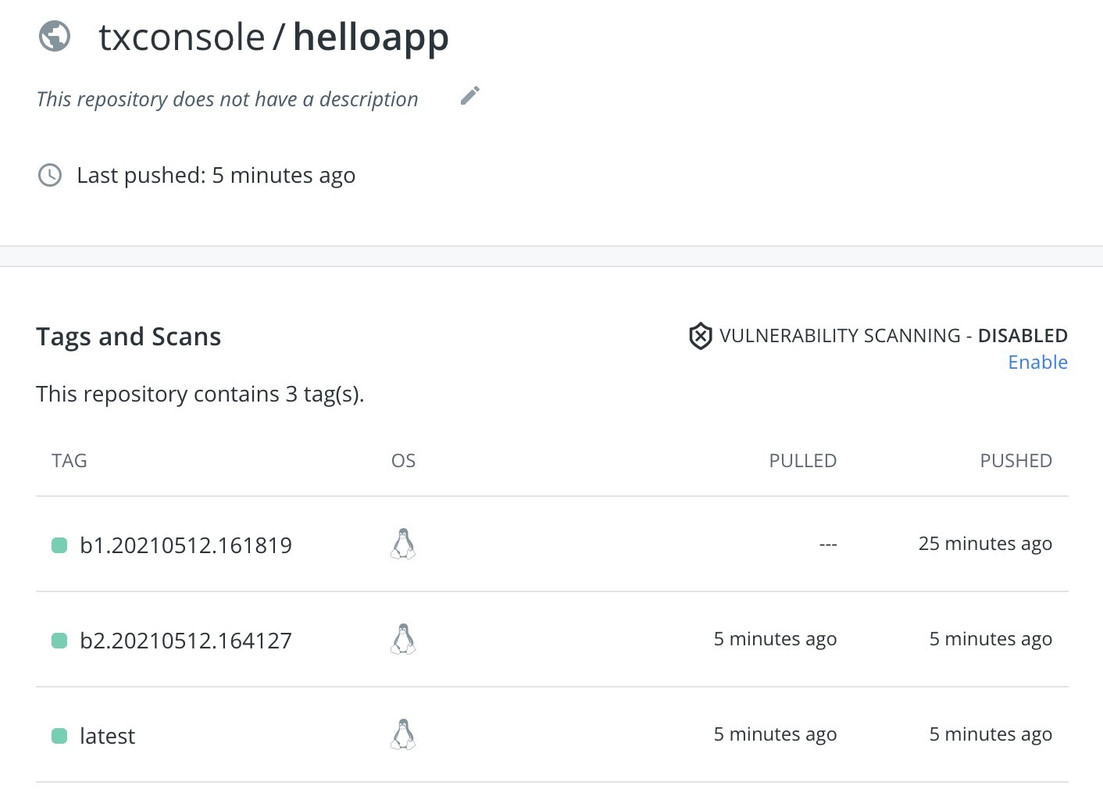
Conclusion
We performed the poc on installing kpack and using it to perform app image build/rebuild which is ready to be consumed for microservice deployment.