AI & ML
Containerizing AI Applications: Architecture and a Hugging Face Example
A practical guide to containerized AI application architecture, with design patterns and a working FastAPI service powered by a Hugging Face model.
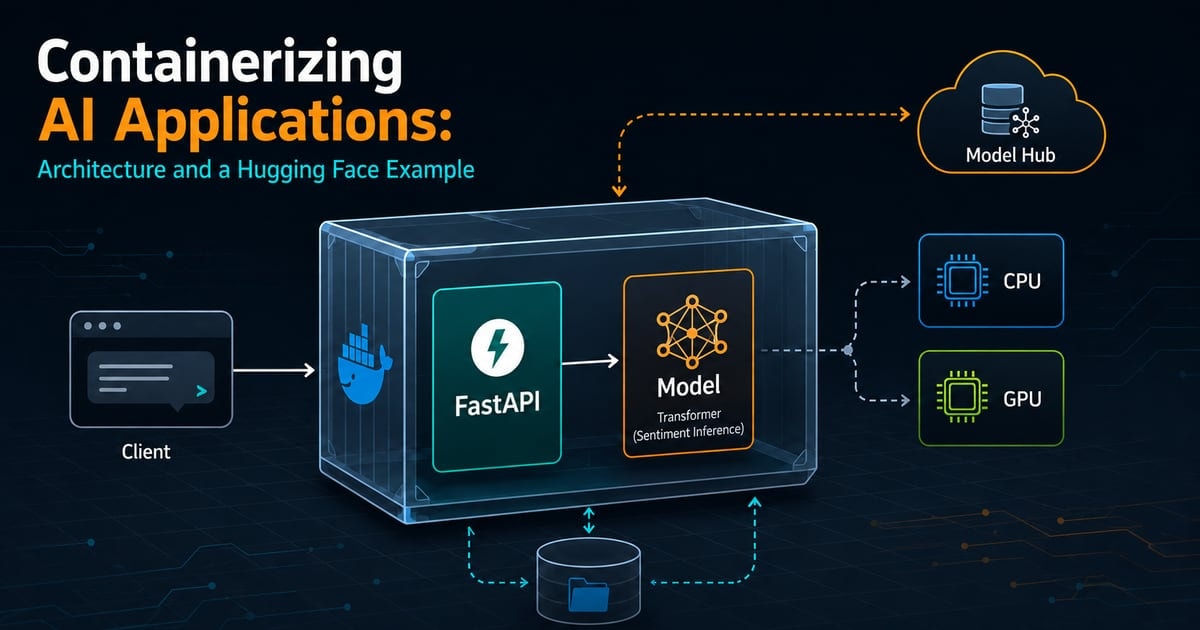
The age old problem, now with ML engineer too: the model works on a laptop, and then it has to be shipped. Framework and CUDA mismatches appear, dependencies behave differently on the prod server, and the container image somehow weighs more than the model itself.
This guide explains the container patterns that matter for AI workloads and applies them with an example: a FastAPI service running a Hugging Face Transformers sentiment model.
Why containerizing AI applications is different
Containerizing a webapp and containerizing an AI application seems similar, but they are not exactly the same. Three differences shape most deployment decisions:
- Model weight: Artifacts can range from hundreds of megabytes to tens of gigabytes. Rebuilding and pushing them with every code change does not scale.
- Hardware coupling: GPU workloads must align with the host driver, container runtime, and the CUDA build used by the ML framework.
- Cold starts: Model download and initialization can take seconds or minutes. Loading a model inside the request handler makes every request pay that cost.
Design decision
To load the model once during application startup
Context
The model is expensive to download and initialize, but every inference request can share the same inference pipeline.
Decision
Create the Transformers pipeline in FastAPI's lifespan hook and reuse it across requests.
Alternatives
- Load the model for every request
- Load it at Python module import time
Consequences
- Predictable request latency
- Startup takes longer and needs a generous health-check grace period
The deployment flow
The application stays small by downloading the model on its first start. A named Docker volume retains the Hugging Face cache, so later container starts can reuse the same files.
Workflow at a glance
-
Structure the project
Separate serving code, dependencies, container configuration, and cached model data.
-
Build a minimal image
Use a build stage for dependencies and copy the resulting virtual environment into the runtime stage.
-
Load the model once
Initialize the pipeline before FastAPI begins accepting requests.
-
Persist the cache
Mount a named volume at the Hugging Face cache directory.
-
Build and test
Start the service, wait for it to become healthy, and call the prediction endpoint.
Project Structure
hf-sentiment-app/
├── app/
│   ├── main.py
│   └── requirements.txt
├── .dockerignore
├── compose.yaml
└── Dockerfile
NOTE: The model is not stored in the project source code. The container downloads it from the Hugging Face Hub into /models/cache, which Docker Compose maps to a named volume.
Choose how to deliver model weights
There isn’t any universal model-distribution strategy. Need to choose based on artifact size, network access, update frequency, and startup requirements.
| Strategy | Image size | Startup | Best fit |
|---|---|---|---|
| Bake into the image | Largest | Fast and offline | Small, fixed models |
| Mount a volume | Small | Fast after provisioning | Development and on-premises |
| Download at startup | Small | Slow on the first start | Cloud-native deployments |
In this example, we followed option to download on startup as it keeps the application image independent of the model artifact. The persistent volume prevents an unnecessary download after every restart.
Building the working sentiment API
Define the Python dependencies
Create app/requirements.txt:
fastapi==0.115.0uvicorn[standard]==0.30.6transformers==4.44.2pydantic==2.9.2The Dockerfile installs PyTorch separately. That makes the CPU or CUDA build an explicit container decision instead of an accidental result of dependency resolution.
Model used in this example
DistilBERT SST-2 sentiment classifier
A compact DistilBERT checkpoint fine-tuned for binary English sentiment classification.
- Provider
- Hugging Face
- Parameters
- 67M
- Modality
- Text
- License
- Apache-2.0
Good use cases
- Sentiment analysis
- Text classification
- Container serving demo
Limitations
- English-language checkpoint
- Binary positive/negative labels
- Not a substitute for task-specific evaluation
More details for the model used can be found at: distilbert/distilbert-base-uncased-finetuned-sst-2-english.
Load the model during FastAPI startup
Create app/main.py:
import loggingimport osfrom contextlib import asynccontextmanagerimport torchfrom fastapi import FastAPI, HTTPExceptionfrom pydantic import BaseModel, Fieldfrom transformers import pipelinelogging.basicConfig(level=logging.INFO)logger = logging.getLogger(__name__)MODEL_NAME = os.getenv( "MODEL_NAME", "distilbert/distilbert-base-uncased-finetuned-sst-2-english",)MODEL_REVISION = os.getenv("MODEL_REVISION", "main")CACHE_DIR = os.getenv("HF_HOME", "/models/cache")models = {}@asynccontextmanagerasync def lifespan(app: FastAPI): device = "cuda:0" if torch.cuda.is_available() else "cpu" logger.info("Loading %s on %s", MODEL_NAME, device) models["classifier"] = pipeline( task="sentiment-analysis", model=MODEL_NAME, revision=MODEL_REVISION, device=device, model_kwargs={"cache_dir": CACHE_DIR}, ) logger.info("Model loaded; service is ready") yield models.clear()app = FastAPI(title="Hugging Face Sentiment API", lifespan=lifespan)class TextRequest(BaseModel): text: str = Field(min_length=1, max_length=2_000)class PredictionResponse(BaseModel): label: str score: float@app.get("/health")def health(): ready = "classifier" in models if not ready: raise HTTPException(status_code=503, detail="Model not loaded") return {"status": "ok", "model_loaded": True}@app.post("/predict", response_model=PredictionResponse)def predict(request: TextRequest): text = request.text.strip() if not text: raise HTTPException(status_code=400, detail="Text cannot be blank") classifier = models.get("classifier") if classifier is None: raise HTTPException(status_code=503, detail="Model not loaded") result = classifier(text)[0] return PredictionResponse(label=result["label"], score=result["score"])FastAPI does not begin serving requests until the code before yield in the lifespan function completes. That gives the application a single shared pipeline instead of creating one for every request.
Create the CPU Dockerfile
FROM python:3.11-slim AS builderENV VIRTUAL_ENV=/opt/venvRUN python -m venv "$VIRTUAL_ENV"ENV PATH="$VIRTUAL_ENV/bin:$PATH"COPY app/requirements.txt /tmp/requirements.txtRUN pip install --no-cache-dir \ torch==2.4.1 --index-url https://download.pytorch.org/whl/cpu \ && pip install --no-cache-dir -r /tmp/requirements.txtFROM python:3.11-slim AS runtimeENV VIRTUAL_ENV=/opt/venv \ PATH="/opt/venv/bin:$PATH" \ PYTHONUNBUFFERED=1 \ HF_HOME=/models/cache \ MODEL_NAME=distilbert/distilbert-base-uncased-finetuned-sst-2-english \ MODEL_REVISION=mainRUN groupadd --system --gid 10001 appgroup \ && useradd --system --uid 10001 --gid appgroup --create-home appuser \ && mkdir -p /models/cache \ && chown -R appuser:appgroup /modelsWORKDIR /appCOPY --from=builder /opt/venv /opt/venvCOPY --chown=appuser:appgroup app/ .USER appuserEXPOSE 8000HEALTHCHECK --interval=30s --timeout=5s --start-period=60s --retries=3 \ CMD ["python", "-c", "import urllib.request; urllib.request.urlopen('http://127.0.0.1:8000/health', timeout=5)"]CMD ["uvicorn", "main:app", "--host", "0.0.0.0", "--port", "8000"]The build stage creates a virtual environment and installs dependencies. The runtime stage receives that environment plus the application code, then runs the API as an unprivileged user.
The health check uses Python’s standard library, so the image does not need curl. Its 60-second start period gives the model time to download and initialize before failures count against the container.
Add .dockerignore
__pycache__/*.py[cod].git/.venv/*.ipynbmodels/cache/.envPersist the model cache with Compose
Create compose.yaml:
services: hf-api: build: . ports: - "8000:8000" environment: MODEL_NAME: distilbert/distilbert-base-uncased-finetuned-sst-2-english MODEL_REVISION: main volumes: - hf-cache:/models/cachevolumes: hf-cache:The first startup downloads the checkpoint. Docker retains it in hf-cache, so rebuilding or replacing the application container does not discard the model files.
Build and test the container
Run the stack, wait for the health check to pass, and then send a prediction request:
docker compose up --build -d
docker compose ps

curl -X POST http://localhost:8000/predict \
-H "Content-Type: application/json" \
-d '{"text":"This container setup works great!"}'
NAME STATUS
hf-sentiment-app-hf-api-1 Up (healthy)
{"label":"POSITIVE","score":0.9998}The exact score can vary slightly between platforms, but the response shape and positive label should remain the same.
Move from CPU to GPU
The application code already selects cuda:0 when torch.cuda.is_available() returns True. The container still needs a CUDA-enabled PyTorch wheel, and the host needs a compatible NVIDIA driver plus the NVIDIA Container Toolkit.
CPU
RUN pip install --no-cache-dir torch==2.4.1 --index-url https://download.pytorch.org/whl/cpu && pip install --no-cache-dir -r /tmp/requirements.txtNVIDIA GPU
RUN pip install --no-cache-dir torch==2.4.1 --index-url https://download.pytorch.org/whl/cu124 && pip install --no-cache-dir -r /tmp/requirements.txtBuild the GPU variant and expose the device at runtime:
docker build -t hf-sentiment:gpu .docker run --rm --gpus all -p 8000:8000 \ -v hf-cache:/models/cache hf-sentiment:gpuProduction checklist
- Keep health checks cheap: Probe readiness, not full inference. A liveness check should not compete with user traffic for CPU or GPU time.
- Separate liveness and readiness: A process can be alive while its model is still unavailable. Kubernetes and similar platforms can represent those states independently.
- Budget memory before adding workers: Each Uvicorn worker generally loads another model copy, which can exhaust RAM or VRAM.
- Pin every moving part: Pin Python dependencies, the model revision, and the container base by digest when reproducible builds matter.
- Treat the cache as operational data: Set its capacity, observe usage, and define a retention policy for old model snapshots.
- Constrain inputs and request size: The example caps input length, but a real service also needs authentication, rate limiting, timeouts, and observability.
- Use a dedicated model server for larger workloads: FastAPI works well for this small example, but large language models or heavy GPU traffic need more specialized tools. Servers such as vLLM, Hugging Face Text Generation Inference, and NVIDIA Triton can group requests and manage GPU memory more efficiently.
Wrapping up
Containerizing an AI application does not have to be complicated. It follows the same basic process as any other application, with a little extra care for large model files, longer startup times, and GPU compatibility.
The main ideas are simple: load the model once, keep its downloaded files in a persistent cache, choose the correct PyTorch build, and give the health check enough time. With those pieces in place, you have a small and repeatable API that you can run locally and adapt for your own model.
Start with the CPU version, make sure everything works, and move to a GPU only when your workload needs it.
Sources and further reading
- Multi-stage builds (opens in a new tab) , Docker
How build stages keep build-time artifacts out of the final image.
- Dockerfile HEALTHCHECK reference (opens in a new tab) , Docker
Health-check behavior, options, and startup grace periods.
- Lifespan events (opens in a new tab) , FastAPI
The recommended pattern for loading one shared ML model before requests begin.
- Pipeline tutorial (opens in a new tab) , Hugging Face
Using Transformers pipelines for task-oriented inference.
- Hugging Face cache management (opens in a new tab) , Hugging Face
Configuring and reusing the local Hub cache.
- Installing the NVIDIA Container Toolkit (opens in a new tab) , NVIDIA
Host-side prerequisites for exposing NVIDIA GPUs to containers.